

What if your OLTP database lived inside your Lakehouse?
In today’s data-driven world, organizations commonly rely on multiple systems to handle fundamentally different types of workloads. Transactional systems (OLTP) manage real-time application data, while analytical systems (OLAP) serve reporting, dashboards, and machine learning pipelines. This separation, though historically necessary, introduces significant complexity, data duplication, and latency in deriving actionable insights.
Databricks Lakebase is designed to address this architectural challenge by bringing native transactional capabilities directly into the Databricks Lakehouse platform — unifying both workloads under a single, coherent system.
What is Lakebase?
Lakebase is a fully managed, PostgreSQL-based OLTP database integrated within Databricks. It is purpose-built to handle real-time transactional workloads — including inserts, updates, and application-level data processing — while remaining tightly coupled to the analytical capabilities of the Lakehouse.
Unlike traditional architectures that mandate separate OLTP and OLAP systems, Lakebase enables seamless integration with Delta tables, allowing transactional data to be made available instantly for analytics and AI workloads without the overhead of additional pipelines.
Why Do We Need Lakebase?
The Traditional Architecture Problem
In conventional data architectures, the typical operational flow is:
- Applications write data to a transactional database such as PostgreSQL or MySQL
- Data is extracted and moved to a data warehouse via ETL pipelines
- Analytics and reporting occur separately, downstream of the source system
This approach introduces several challenges:
- Increased system complexity and infrastructure surface area
- Data duplication across transactional and analytical stores
- Latency in surfacing insights due to pipeline delays
- Significant maintenance overhead for ETL jobs
Lakebase simplifies this by enabling a unified architecture where transactional and analytical workflows coexist within the same platform — eliminating the need for redundant infrastructure.
1. Creating a Lakebase Instance
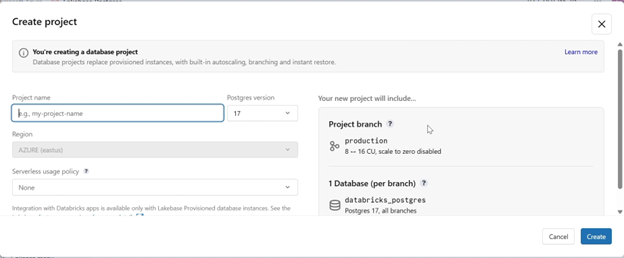
To get started, navigate to the Compute section within the Databricks workspace. Under the Lakebase option, select Create Database Project. A configuration panel appears where you can specify:
- Project name
- PostgreSQL version
- Basic compute settings
Once provisioned, the Lakebase instance is immediately ready for table creation and transactional operations — typically within seconds.
2. Understanding the Project Dashboard
After provisioning, the Project Dashboard provides centralized access to all key operational components.
Connect
The Connect option allows you to integrate Lakebase with external tools or applications. It provides connection details such as host, database, user, and authentication token.

Compute
Compute is the execution engine responsible for processing all query operations — inserts, updates, and selects. Lakebase leverages auto-scaling compute that dynamically adjusts capacity based on workload demand.
Monitoring Graph
The monitoring graph provides a real-time view of CPU and memory utilization, enabling performance tracking and analysis of workload patterns over time.
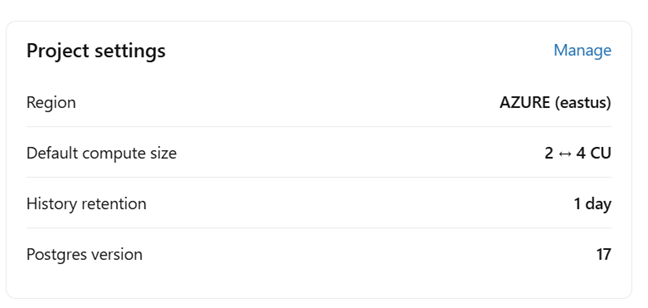
Project Details
The right-hand panel displays the complete configuration profile of the database instance, including deployment region, compute size, history retention window, and PostgreSQL version
3. Branching in Lakebase
One of Lakebase’s most distinctive capabilities is Git-like branching for databases — a paradigm shift from traditional database management practices.
Why Branching Matters
In traditional systems, testing schema changes or data transformations directly in production carries significant operational risk. Branching addresses this by enabling fully isolated database environments that can be created, modified, and discarded without impacting live data.
How It Works
- Create a new branch from the production branch
- Apply schema or data changes safely within the isolated environment
- Validate changes against real or representative data
- Promote to production once validation is complete
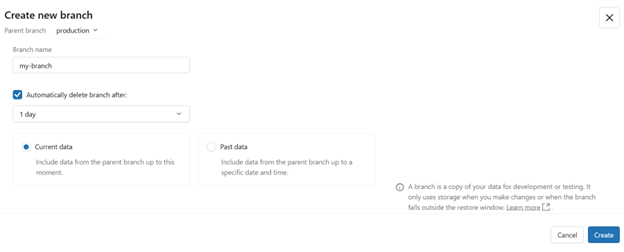
Lakebase also supports creating a branch from a specific historical point in time — particularly valuable for debugging scenarios where you need to replicate the database as it existed at an earlier moment.
Once created, a branch operates as a fully independent environment. All schema modifications and data updates within the branch remain isolated until explicitly promoted, ensuring auditable and controlled deployments.
4. Settings and Configuration
The Settings section provides critical administrative controls for the Lakebase instance.
Instant Restore
Defines the recovery window for the database. This configuration enables point-in-time recovery, time travel queries, and branching from historical database states.
Project Permissions
Controls access at the project level. Administrators can assign roles and permissions to ensure that only authorized users can interact with sensitive database resources.
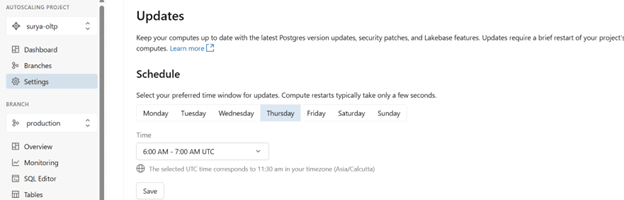
Update Schedule
Allows scheduling of system updates — including patches and version upgrades — during defined low-traffic windows to minimize disruption to active workloads.
5. SQL Editor and Table Management
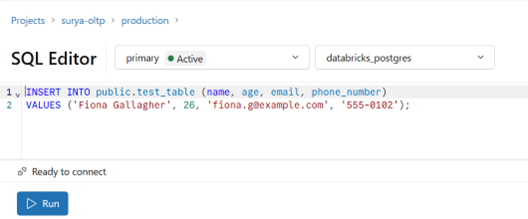
SQL Editor
The SQL Editor provides a standard PostgreSQL-compatible query interface for executing DDL and DML operations directly against a Lakebase instance.
Tables Section
The Tables section provides a visual representation of all tables within the active database — supporting schema exploration, data preview, and structural analysis

6. Backup and Restore
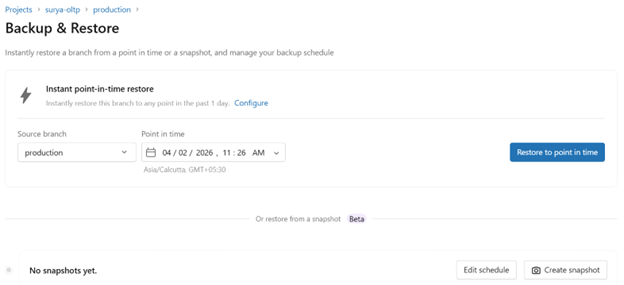
Lakebase includes built-in backup and point-in-time recovery capabilities, addressing one of the most critical requirements in production database management.
To restore a database:
- Select the source branch to restore from
- Choose a specific point in time within the retention window
- Initiate the restore to bring the database back to the chosen state
This capability is essential for recovering from accidental deletions, incorrect bulk updates, or application-level data corruption — providing a reliable safety net without requiring third-party tooling.
7. Data API
Lakebase exposes a RESTful Data API that enables application-layer interaction with the database without requiring traditional connection-based drivers. This is particularly relevant for web and mobile applications that benefit from HTTP-based data access.
Through the Data API, applications can:
- Insert new transactional records
- Execute queries and retrieve data programmatically
- Update existing records via REST endpoints
This abstraction simplifies integration, reduces dependency on database client libraries, and aligns well with modern microservice and serverless application architectures.
8. Syncing with Delta Tables
Overview
One of the most strategically significant capabilities of Lakebase is its native ability to synchronize transactional data with the Databricks Lakehouse using Delta tables. This eliminates the need for traditional ETL pipelines and enables near real-time availability of transactional data for analytics and AI workloads.
Sync Modes
- On-Demand (Snapshot) — a full point-in-time copy of the table, triggered manually
- Triggered — scheduled incremental synchronization at defined intervals
Continuous — real-time synchronization of changes with minimal latency, typically within seconds
Prerequisites
Before creating a synced table, ensure the following conditions are met:
- A Delta table exists and is accessible in Unity Catalog
- A Lakebase database instance has been provisioned
- The user holds the required permissions: USE_SCHEMA and CREATE_TABLE
Step-by-Step: How to Sync a Table
Step 1: Navigate to the Catalog — Open the Data Explorer and select the Unity Catalog Delta table you intend to sync.
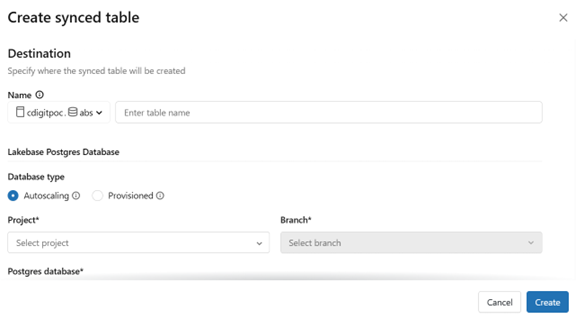
Step 2: Create Synced Table — Click Create → Synced Table to open the sync configuration screen.
Step 3: Configure the Target — Provide the table name, target catalog and schema, Lakebase instance, and PostgreSQL database name. Databricks creates the target database automatically if it does not exist.
Step 4: Select a Primary Key — Choose a primary key column. This is mandatory for efficient change tracking. Rows with NULL primary key values are excluded from synchronization.
Step 5: Configure Deduplication (Optional) — Select a Timeseries Key to ensure only the most recent record per primary key is retained in the synced table.
Step 6: Choose the Sync Mode — Select Snapshot, Triggered, or Continuous based on your latency tolerance and throughput requirements.
Step 7: Configure the Pipeline — Create a new Lakeflow pipeline or attach to an existing one. Databricks manages the full sync lifecycle automatically.
Step 8: Create and Monitor — Click Create. Synchronization begins immediately. The status transitions to “Online” once the initial sync completes, and progress can be tracked through the UI.
Post-Sync State
Once synchronization is established:
- A PostgreSQL table is created and actively maintained within Lakebase
- The synced table is registered in Unity Catalog for centralized governance and discovery
- Data remains continuously synchronized between the Delta table source and Lakebase
Note: Synced tables are read-only within Lakebase by default to maintain consistency with the Delta table source.
Querying a Synced Table
Once synchronized, the table is immediately queryable via the SQL Editor, external tools such as pgAdmin or DBeaver, or through application-level database connections. Example:
SELECT * FROM orders_synced;
Conclusion
Databricks Lakebase represents a meaningful evolution in data platform architecture. By bringing native OLTP capabilities into the Lakehouse, it eliminates the traditional boundary between transactional and analytical systems — reducing infrastructure complexity, accelerating time-to-insight, and enabling unified governance across both workload types.
The combination of Git-like branching, point-in-time restore, native Delta table synchronization, and a RESTful Data API makes Lakebase a versatile and production-ready solution for organizations looking to consolidate their data infrastructure without sacrificing capability.
Whether you are building real-time applications, supporting operational analytics, or enabling AI-driven workflows, Lakebase provides the transactional foundation to do so — directly within the platform you already use for large-scale data processing.
Practical Demonstration
Watch a hands-on walkthrough:


